

What’s supported
Supported actions
This connector supports:- Read Actions, including full historic backfill. Please note that incremental read is only supported for
jobs,jobs/history,jobs/custom-fields,contacts/custom-fields,estimates/sections, andcompany-settings/custom-fields. - Write Actions.
- Subscribe Actions. Ampersand creates and updates the AccuLynx webhook subscription on your behalf when the customer installs your integration — no manual webhook setup is required in the AccuLynx UI.
- Proxy Actions, using the base URL
https://api.acculynx.com.
Supported objects
The AccuLynx connector supports the following objects:- acculynx/countries (read only)
- acculynx/units-of-measure (read only)
- calendars (read only)
- calendars/appointments (read only)
- company-settings/custom-fields (read only)
- company-settings/job-file-settings/document-folders (read only)
- company-settings/job-file-settings/insurance-companies (read only)
- company-settings/job-file-settings/job-categories (read only)
- company-settings/job-file-settings/photo-video-tags (read only)
- company-settings/job-file-settings/trade-types (read only)
- company-settings/job-file-settings/work-types (read only)
- company-settings/job-file-settings/workflow-milestones (read only)
- company-settings/leads/lead-sources (read only)
- company-settings/location-settings/account-types (read only)
- contacts (read, write, and subscribe)
- contacts/contact-types (read only)
- contacts/custom-fields (read, write, and subscribe)
- contacts/email-addresses (read only)
- contacts/logs (write only)
- contacts/phone-numbers (read and write)
- estimates (read only)
- estimates/sections (read only)
- jobs (read, write, and subscribe)
- jobs/contacts (read and subscribe)
- jobs/custom-fields (read, write, and subscribe)
- jobs/estimates (read only)
- jobs/external-references (write only)
- jobs/history (read only)
- jobs/initial-appointment (write only)
- jobs/insurance/insurance-company (write only)
- jobs/invoices (read and subscribe)
- jobs/messages (write only)
- jobs/messages/replies (write only)
- jobs/milestone-history (read and subscribe)
- jobs/payments/expense (write only)
- jobs/payments/paid (write only)
- jobs/payments/received (write only)
- jobs/representatives (read and subscribe)
- jobs/representatives/ar-owner (write only)
- jobs/representatives/company (write only)
- jobs/representatives/sales-owner (write only)
- supplements (read only)
- supplements/items (read only)
- supplements/notations (read only)
- users (read only)
Writes to top-level
jobs and contacts (and all nested jobs/* and contacts/* write endpoints except custom-fields) are create-only — AccuLynx does not expose update endpoints for these records. Writes to contacts/custom-fields and jobs/custom-fields are update-only; AccuLynx does not expose an API to create, update, or delete custom field definitions themselves. Deletes are supported only on jobs/representatives/ar-owner and jobs/representatives/sales-owner (clearing the rep slot on a job).contacts and jobs records. First-class subscribe events (create and update) are available on contacts and jobs; webhook coverage for the other 6 subscribe-tagged sub-objects is declared with otherEvents under the parent contacts or jobs object in your amp.yaml.
Example integration
To define an integration for AccuLynx, create a manifest file that looks like this:Before you get started
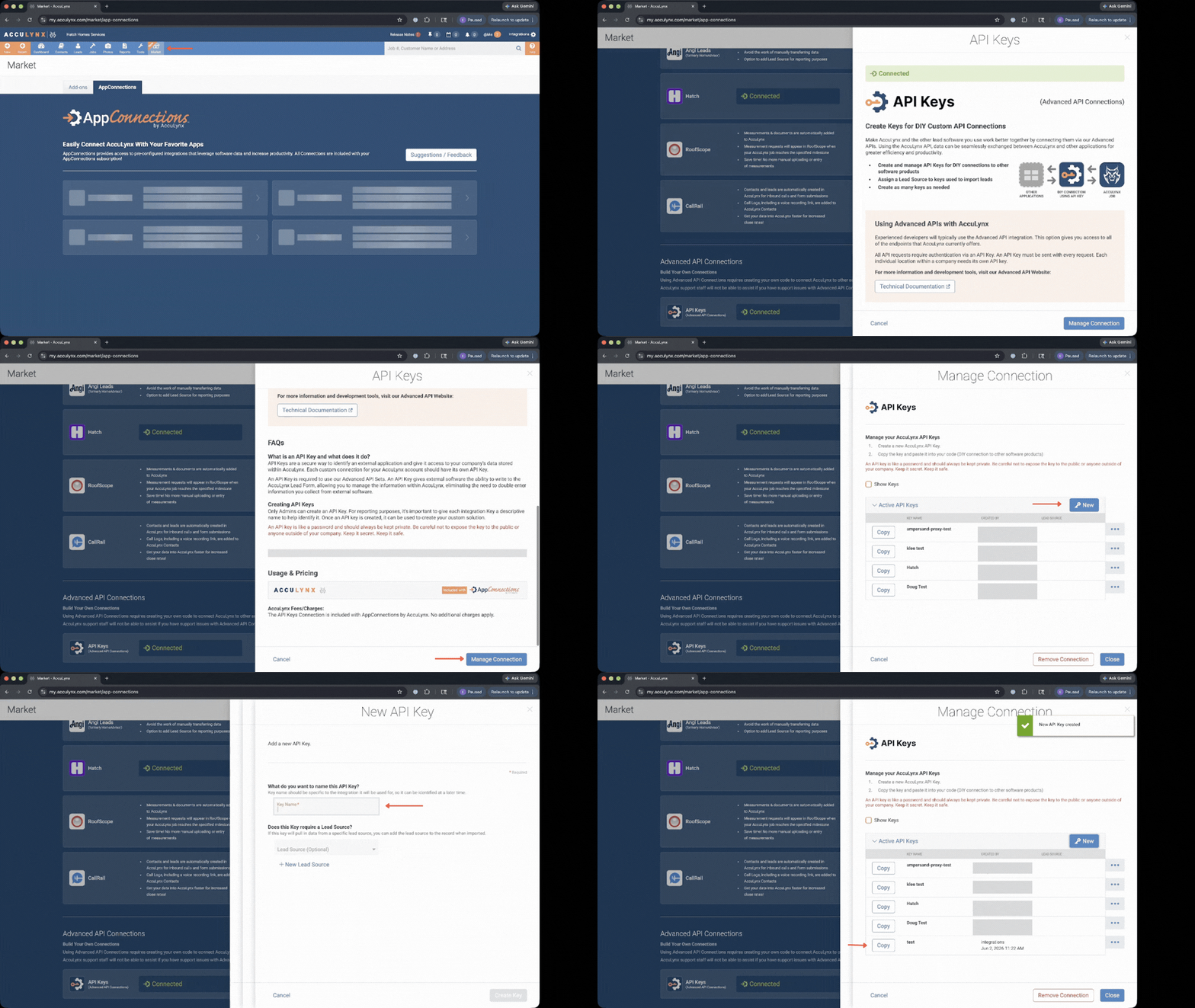
To use the AccuLynx connector, you’ll need an API key from your AccuLynx account. Here’s how to get it:- Sign in to your AccuLynx account as a Location or Company Administrator.
- Click your name in the upper-right corner and select Account Settings.
- In the left sidebar, expand Add-On Features and Integrations and click API Keys (or go directly to the API Keys page).
- Click Create Key, enter a descriptive name, and select a Lead Source.
- Click Create Key in the modal, then Copy Key to copy the token.
Using the connector
This connector uses API Key authentication, so you do not need to configure a Provider App before getting started. (Provider Apps are only required for providers using the OAuth2 Authorization Code grant type.) To integrate with AccuLynx:- Create a manifest file like the example above.
- Deploy it using the amp CLI.
- If you are using Read Actions or Subscribe Actions, create a destination.
- Embed the InstallIntegration UI component, which will prompt the customer for their API key.
- Start using the connector!
- If your integration has Read Actions or Subscribe Actions, you’ll start getting webhook messages.
- If your integration has Write Actions, you can start making API calls to our Write API.
- If your integration has Proxy Actions, you can start making Proxy API calls.